Category: Uncategorized
GForge v19.0 Released!
 We’re happy to announce our first GForge release for 2019 is available! v19.0 adds a number of new features and comes with a number of bug fixes.
Getting Started with GForgeNext
Highlights in GForge v19.0
Sprint Retrospectives – For Agile and Scrum teams GForge already lets you create, track and manage the burndown of your sprints. In 19.0 can now assess and reflect on sprints with Sprint Retrospectives. Retrospectives include a report of key metrics and then allow you to provide a narrative to identify what worked well, what challenges you had and come up with actions and ideas going forward.
Tickets: Related Items – A challenge for all teams is reducing duplicated work. When creating new tickets, GForge will now identify related items allowing you to quickly determine if you are working on a problem that has already been identified and possibly fixed. GForge can show its own related tickets as well as possible matches on StackOverflow.
Offline Installation/Upgrades – If you need to install or upgrade GForge in a secure location in your network on a host that doesn’t have outbound internet connectivity GForge now supports offline installations and upgrades.
Moderated LDAP/SSO Accounts – You can now configure GForge to send new accounts registered via LDAP/SSO to a queue where they await formal approval by a GForge Administrator.
Organization – For customers with large project portfolios you can now organize your project into organizations. Organizations also provide the organization a place where they can collaborate across projects inside the organization.
- The v19.0 ChangeLog will help you understand the changes you can expect.
- The GForgeNext FAQ will answer most of your questions but don’t hesitate to send additional questions.
- Just a reminder for customers still running GForge Advanced Server (v6.4.5 and prior) we are planning on officially dropping support in October of 2020. Please feel free to reach out to us for a free consultation on the planning and upgrade paths.
GForge and Open Source Software
Old School OSS
I can recall the low beam of light from a CRT monitor that was hooked up to a 333MHz Intel Pentium II computer that provided just the right amount of hum from its tower to compliment the loud clicks I was orchestrating from my cheap IBM keyboard. I was sitting on an equally cheap, metal folding chair positioned perfectly in front of a card table that hosted the monitor. That was the scene as I made my first open source contribution, using Slackware 3.x.
Today, I can replay all the different ways open source software shaped my professional career and the vision and value systems we hold here as we reinvent and reintroduce GForge. Admittedly, many familiar with GForge know it more from its roots at SourceForge.net and its impact on open source software back in the 1990s. A lot has changed and open source software has continued to thrive beyond its original, organic roots to claim a rightful place in organizations of all sizes.
Today’s OSS
There is no industry immune from the influence of open source software. Cloud computing, DevOps, fintech, medicine, banking and governments at all levels are deploying some level of open source software but what gets lost in the fray is their true relationship with open source software. There could be more, but I see three distinct relationships an organization can have with open source software.
- Consumers – These organizations simply consume open source software. This could be viewed negatively but having led an open source project I can attest that there is a tremendous amount of pride seeing people use software you helped build.
- Contributors – While they also consume, these organizations also make contributions back to open source projects in the form of bug reports and possibly small patches. Finding bugs is hard work that open source projects appreciate and nothing feels better when someone using code you helped build finds and submits the fix.
- Collaborators – The organizations I respect most not only contribute but they actively collaborate on open source software. These are the organizations that understand that OSS is more than just source code, they are communities with vision that sustain real, long-standing relationships that cross industries, geography, religion, politics and socio-economics. I can’t begin to enumerate the number of great people that have influenced me professionally and personally as a result of open source collaboration.
GForge and OSS
Ok, I can hear you asking “Where is this going and why write all this when GForge is a commercial offering ” As an organization GForge sits in that “Contributors” relationship with open source. While that’s not bad, we do have aspirations to improve our relationship and we have chosen to apply the principles we’ve learned from open source in how we engage in business. Specifically:
- You get our source code – While GForge is a commercial product we ship the source code for our entire codebase minus the bits that do the license key checking. Also, GForge is free for up to 5 users and is free to open source organizations.
- We value transparency – Providing our source code can be viewed as a risk but for our customers it allows them to do a deeper inspection of our features, code quality and they can perform their own, independent security audits.
- Security vulnerabilities are good – Sadly, my name is associated with some pretty nasty vulnerabilities and there are only four appropriate things to do when that happens: 1) swallow your pride 2) thank and give the reporter official credit 3) find, fix and announce the vulnerability quickly 4) learn from the mistake.
- Better customer relationships – We make it possible for customers to access our codebase via Git. This not only makes customizations possible it makes those changes maintainable over time while still take advantage of our new features and bug fixes.
- Avoid vendor lock-in – We are a vendor so you probably think vendor lock-in is good, right I’ve been on both sides of this table and by providing our source code, by using an open source database (PostreSQL) and providing a slick REST-ful API we are conveying to our customers and prospects that we know they have choices and our open approach is the foundation for the relationships we build with our customers.
GForge Going Forward
Last month we reintroduced GForge with our first release of what we dubbed “GForge Next”. Our goal was to make GForge Comprehensive, Simple and Elegant by paying down over a decade of technical debt that positions us to focus innovation. GForge has a long history with open source software that we plan to expand on and if the above values resonate with you, we invite you to explore what we’ve learned in 20 years of helping teams Build Better Software.
Learn More about GForge | Take a Tour
Download GForge or Host a Project with us
Securing GForge on Apache httpd Server

Secure connections are integral to keeping your important information safe, on the Internet or your private company network. For years itâs been fairly simple â turn on SSL, buy a certificate and let the browsers ensure that your data stays private. Unfortunately, itâs no longer that simple.
Over the last 15 years, computing power, virtual servers and good, old-fashioned software bugs have all conspired to make much of the encryption plumbing from the last 15 years obsolete. In fact, itâs very likely that if youâre running Apache httpd and mod_ssl, youâre allowing protocols and ciphers that expose your server (and your data) to needless risk of compromise.
Note: If youâre a customer, and GForge Group manages your server, these security updates are already in place. Get in touch if you have any other questions.
Check Yourself
Itâs actually pretty easy to test your system, and it can be done in production, without affecting your current users.
For servers that are on the Internet, you can use an online scanner. Hereâs SSLLabs, from Qualys:
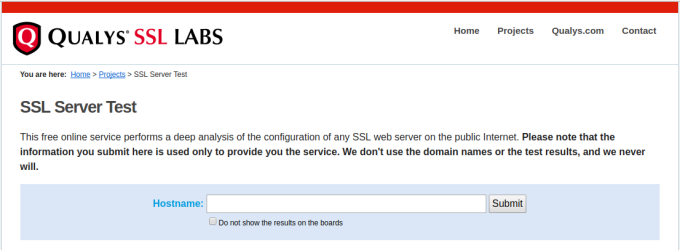
Enter your siteâs URL and click Submit. After a minute or two, youâll get output like this:
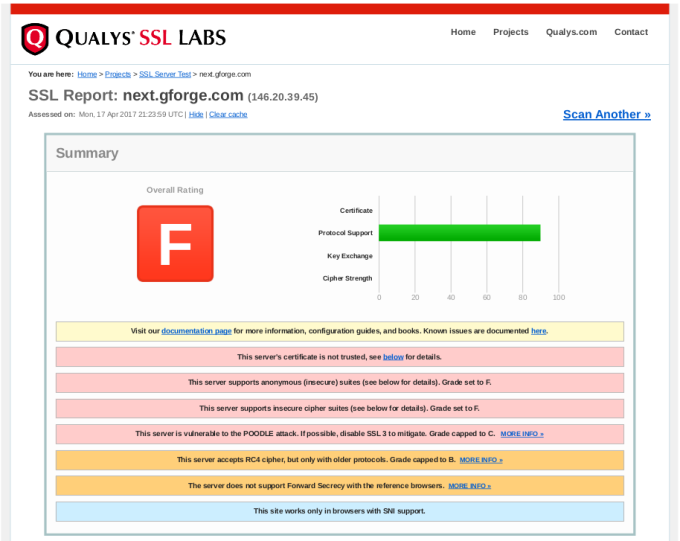
In the report details, you will find explanations of anything marked as a problem from your server, including how to close security holes that were found.
If your server isnât on the Internet (i.e., on your internal network), then youâll need to download and run scanning tools yourself. Here are some popular ones:
- TLS Observatory â An open-source scanner from Mozilla, written in Go. Youâll need the Go runtime to run this on your server or desktop, or you can use the Docker image. Performs scanning for both the SSL/TLS version and cipher suite(s) in use.
- Cipherscan â Another tool from Mozilla, written in Python.
Get With The Times
After running your scans, youâll need to decide what changes (if any) to make to your SSL configuration. Itâs important to understand that choosing the most up-to-date settings will leave out some older clients. Fortunately, Mozilla also has a great online tool to help you balance security with compatibility.

Give this tool your current version of Apache httpd and OpenSSL, and youâll get various choices for maximum security versus maximum compatibility.
Our Recommended Configuration
In the end, we went with the Modern configuration, but added the AES256-SHA256 cipher back to the list. This allows only TLS 1.2 (the most secure), but adding that one cipher back keeps compatibility with older non-browser clients like curl, so that existing SVN and git over HTTPS are not broken.
Hereâs the configuration snippet we recommend for GForge servers:
<VirtualHost *:443>
    ...
    SSLEngine on
    SSLCertificateFile /path/to/signed_certificate_followed_by_intermediate_certs
    SSLCertificateKeyFile /path/to/private/key
    # Uncomment the following directive when using client certificate authentication
    #SSLCACertificateFile /path/to/ca_certs_for_client_authentication

   # HSTS (mod_headers is required) (15768000 seconds = 6 months)
    Header always set Strict-Transport-Security "max-age=15768000"
    ...
</VirtualHost>

# modern configuration, tweak to your needs
SSLProtocol all -SSLv3 -TLSv1 -TLSv1.1
SSLCipherSuite AES256-SHA256:ECDHE-ECDSA-AES256-GCM-SHA384:ECDHE-RSA-AES256-GCM-SHA384:ECDHE-ECDSA-CHACHA20-POLY1305:ECDHE-RSA-CHACHA20-POLY1305:ECDHE-ECDSA-AES128-GCM-SHA256:ECDHE-RSA-AES128-GCM-SHA256:ECDHE-ECDSA-AES256-SHA384:ECDHE-RSA-AES256-SHA384:ECDHE-ECDSA-AES128-SHA256:ECDHE-RSA-AES128-SHA256
SSLHonorCipherOrder on
SSLCompression off
SSLSessionTickets off

# OCSP Stapling, only in httpd 2.3.3 and later
SSLUseStapling on
SSLStaplingResponderTimeout 5
SSLStaplingReturnResponderErrors off
SSLStaplingCache shmcb:/var/run/ocsp(128000)
Signs That Youâve Outgrown Github, Part 3:Â Merges
This is part 3 in a series about the limitations of Github, and how they might be holding your team back from its full potential. If you want to go back and catch up, hereâs Part 1 and Part 2.
Go ahead, Iâll wait right here.
Done Okay, letâs move on.
Todayâs discussion is about getting code merged. Itâs one of the most fundamental things any software team has to do. If your team is anything like ours, itâs something you do many times every day. It might even be the kickoff for your Continuous Integration/Delivery process, as it is for us.

Getting things out quickly is important, but preventing outages from bad code is even more important. You probably want an easy way to review and even test code that doesnât distract too much from the work youâre already doing.
Once again, Github has a wonderful system for promoting code from one repository or branch to another â the Pull Request (PR herein). In particular, the PR is great for open-source projects where people might want to contribute, even if theyâre not members of the main project. The proposed contributions can be examined by the main project member(s) and be pulled in only if theyâre helpful.

But like many other Github features, you may find the PR process to be mis-aligned to your needs, in a way that creates a little extra delay and a bit of confusion every time you use it.
Pull Requests 101
For those who havenât tried one yet, a pull request (PR) is a special kind of task, asking someone to merge a set of changes (commits) from one place to another. In more general terms, you can think of it as promoting a chunk of work from one level to another â such as from a development branch to test and then to production, or from a hotfix branch to long-term-support.

Because itâs a request, it doesnât involve any access to the project repository from any non-members. The project team can review the proposed changes and take them, ask for revisions, or ignore them. Itâs a great model for open-source or otherwise loosely-coupled groups to share ideas and improvements.
Keep It In One Place
But that flexibility comes at a cost. Pull Requests are opened and managed separately from individual tasks, so youâre basically creating another task to review each taskâs work. The open or closed status of each task can be independent of the status of the related PR. Additionally, thereâs nothing stopping someone from submitting changes for multiple tasks in one PR, which can be confusing and difficult to review.
For software teams that arenât open-source, this loose coupling actually creates more process, more overhead, and time thinking that could be spent doing instead.
Ask yourself â wouldnât it be a lot easier to merge the code as an integral part of the task itself
Singularity Of Purpose
Letâs start with an assumption â that in order to change your code, there should be a defined reason for doing so.
Youâre writing code because something needs to be added or fixed. Thereâs a use case. A story. A bug. A feature. A customer who wants something. Thereâs a reason to change what you already have.
You probably also want to do two things with your tasks:
- You want to create a plan ahead of time, for which things will be done, by whom, in what order.
- You want to keep track of progress as things move along.
Once you start depending on tasks for planning and tracking, you can begin to improve your overall process, reducing the number of steps and the distance between idea and working code. As you do, separate PRs may start to lose their appeal. Asking developers to open a separate kind of ticket to get code merged is a hassle. Allowing them to put multiple bug fixes into one merge is asking for confusion and mistakes.
If youâre delivering code using a well-defined workflow, PRs can actually cause problems:
- Audit trail â Itâs difficult (or impossible) to know later which code changes went with which task.
- Larger merges â the code review itself becomes much more complicated, since there are more commits, more changes files.
- All or nothing â If you like the changes for task #1, and for task #2, but there are problems with the tests for task #3, the whole PR is sent back for rework. This means youâre likely sitting on changes for longer.
- More conflicts â Pretty simple math: (Larger merges) + (All or nothing) = More conflicts.
Since thereâs no way in Github to limit the content of a PR, thereâs no good way to prevent this kind of behavior. Creating a PR for every single bug becomes a tedious time-sink that doesnât add value to your day.
Now, you might argue that a Github PR can act as the task itself, and it does â but not really. PRs are only retrospective, meaning that you create one after (or while) doing the work. If you donât create tasks before doing the work, then youâll never have any way of planning or tracking progress.
Simplify, Simplify
For most teams, the overlap between tasks and PRs is additional work that doesnât generate any value. What you really need is a way to automatically detect code changes, review those changes and then promote them to dev, test and production, all as part of the task.
This kind of integration means that you can go back to the task later, understand the intent of the change, and also see the code changes that went with it. Your task tracking becomes a source of institutional memory, so that people can move in and out of the team, or across different features without making old mistakes over and over again.
If your tools are preventing you from improving your process, maybe itâs time to improve your tools.
Come try GForge Next for simple, comprehensive and elegant collaboration.
Signs That Youâve Outgrown Github, Part 2: Task Management
In my last post, I introduced a set of features (and failings) that might have you wondering if Github can grow with your team. In this post, Iâm talking about tasks, workflow and keeping things moving.
Githubâs Workflow Is Simple And Cool
When youâre starting out, Githubâs approach is really helpful. You can create a task with just a summary sentence. If you want, you can add a more detailed description and some labels.
Tasks are open or theyâre closed, and you can close a task with a commit. From a developerâs perspective, itâs wonderful to grab a task and write some code, then update the task without having to visit the website. You get to stay in your IDE, your command-line â whatever tools youâre using to do the work.

The Real World Gets Complicated
These features work very well for teams that are just starting out, and for projects that may have somewhat disconnected participants (e.g., open-source projects). But as your team begins to deal with marketing, sales, customers, or even other dev teams, you may rub up against some important limitations.
Thereâs more to life(cycle) than Open and Closed
Very often, there are other pieces to your workflow than just coding. There could be planning, design, code review, testing, deployment, and other activities. Itâs pretty common to reflect some of that workflow in the status, so that everyone can tell where a task is and what needs to be done next, without having to re-read then entire history.

Closing a task just because youâve committed some code assumes that everything else will go right. Usually, committing code is the beginning of the process, not the end.
Not everything fits in the same box
Not everything is a task to be done in the code. Sometimes, you want a place to flesh out a user story, or discuss the design for a specific page. Maybe you need to track servers, or which customers have which version of your product.

You might be able to jam these different kinds of information into a Github task, but it ends up being a bigger version of the labeling problem from my previous posting.
Whatâs going on
Github has some pretty decent release/milestone tools, and you can group tasks into a milestone to track overall completion. That project-level view can be great, but what about planning and tracking your current sprint Or planning and tracking your own day
Standups get a lot easier when you can automatically see what the team worked on recently, and when the team can identify what they plan to work on.
Whatâs really important
This is one that everyone runs up against pretty quickly. Putting a priority on each task allows the team to keep moving, by knowing which tasks to work next. Without prioritization, everyoneâs just guessing about what is most important.
Github has no way to prioritize tasks. Even if you use a label (to beat a dead horse), you wonât be able to sort them.
Plans get tangled up
Itâs pretty easy to enter and manage tasks in Github, and depending on your level of detail one task might be completely stand-alone from another. Almost inevitably, though, a task will be blocked, waiting for some other task to finish. Your new web page needs an API update from someone else. A customerâs support ticket might be waiting on a bug that someone is working on. Or a use case canât be complete until all three web pages are working together.

The ability to manage dependencies has been asked and discussed many times over the years, and Github just doesnât want to take on the complexity. It doesnât have to be a Gantt chart, but making sure that everyone knows when tasks are blocked (and when they become unblocked) is key to maintaining project momentum.
A More Realistic Approach
First off, donât expect Github to change. The simplicity of their task management is perfectly suited for many, MANY projects. Itâs easy to get started with, and is a great place for sharing open-source and personal projects.
But maybe your team has started to suffer from that simplicity, and youâre looking for something to fill in the gaps that Github leaves. You might even be tempted to try one of the dozens of âbolt-onâ tools that claim to integrate tightly with Github.
Instead, let me suggest that what you really need is something that was built from the ground up to start simple, grow to be comprehensive, and stay elegant. Something thatâs easy to use, but allows more complexity as you grow into it.
Here are a few more simple pieces of advice:
- Instead of shying away from adding different status values, be honest about the workflow you want and make the tool serve your needs.
- Consider that maybe you need a different set of fields for tracking use cases or UI designs, versus coding tasks, versus customer support.
- Donât settle for something thatâs too simplistic, or a patchwork of loosely-coupled tools, when working around their limitations will cost you time thatâs better spent on your actual mission.
If your tools are preventing you from improving your process, maybe itâs time to improve your tools.
Come back soon for another sign that you might have outgrown Github .
Come try GForge Next for simple, comprehensive and elegant collaboration.
Signs That You’ve Outgrown Github
Github is WONDERFUL. I have used it for a long time now, and itâs great. Itâs easy to get started, and especially for one-person projects, it really helps keep things organized.
But as you start to add team members, competing priorities, and overall complexity, something changes. In lots of little ways, Github starts to show that it just wasnât designed for long-haul software projects, with many team members and a non-trivial workflow.
Here are some of the things you might already be dealing with:
- Youâve created so many labels that youâve written a wiki page to tell everyone how to use them (and how NOT to use them!)
- Maybe you want to keep track of bugs and support tickets separately.
- Perhaps you donât think that developers should be able to close a ticket just by committing code.
- Maybe youâre tired of having to search in Google Docs, Basecamp, Slack and Github to find where you talked about that new feature.
- Could be that you need to manage the relationships between tasks that depend on or block each other.
Iâll do a blog post for each of these topics. This week, letâs start with the first one â labels.
Labels
Labels are quick and easy to use, offer a lot of flexibility and require virtually no setup or configuration overhead. The default labels in Github look something like this:
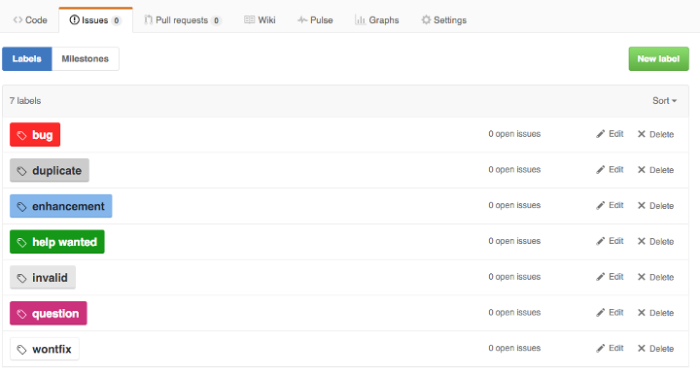
Those are probably fine for 98% of new Github projects. Over time, however, most teams will expand on the list of tags to include different values than the default list, and even different types of data. Adding categories for basics like type, priority, and status makes a lot of sense when youâre managing a backlog. But all of those new values expands the list beyond what you can keep straight in your head.
So, how can teams use complex label sets reliably One common convention is to use a prefix word to identify the group to which each label belongs (courtesy of Dave Lunny):
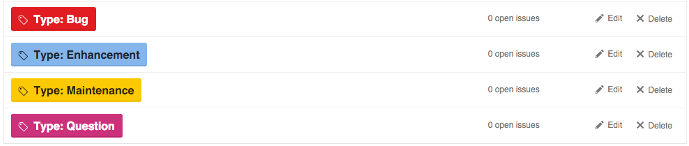

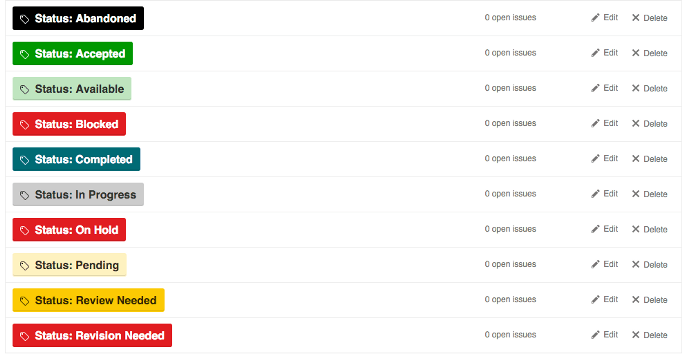
This approach has the benefit of including the type of label as part of the label text, so you wonât be confused between âStatus: Testâ, âEnvironment: Testâ, and âTask Type: Testâ. Visually, the various colors can be used to show differences in the specific values, like production vs non-production, or high priority vs lower priority.
The downside is that when viewed across label types, the different colors are confusing and even downright jarring. Instead of quick visual signals based on color, you actually have to read each label value. Itâs bad enough when looking at a single task, but when browsing a list of tasks, it can be a hot mess.
Another approach is to use similar colors for grouping. Hereâs an example (from robinpowered.com):
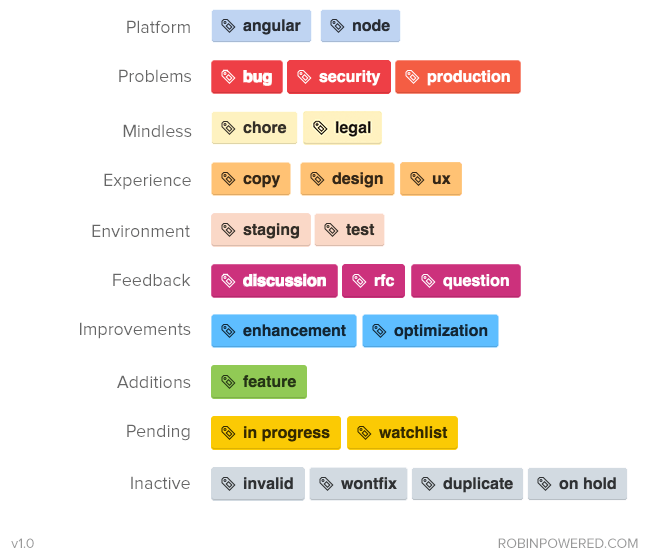
While itâs much easier on the eyes, you no longer have the label type included with the label value. Also, this particular set of labels combines and separates a lot of values in ways you wonât appreciate later â for example, why is the production label in âProblemsâ and not âEnvironmentâ Thereâs likely information on a wiki page somewhere, explaining that you donât choose anything from âEnvironmentâ when itâs a production issue, right
This next example isnât really an example at all, but a cautionary tale. Imagine walking into your first day with these guys:

This isnât someoneâs drug-addled fantasty project, either â itâs servo, a very active and popular project on Github.
Tools For Your Tools
In response to this widespread need, there are actually tools (like git-labelmaker) dedicated to helping Github users automate the creation and management of complex sets of labels, using different naming conventions, color schemes and labeling styles. Which is very cool â except that it seems like an awful lot of work to go through, doesnât it If someone has created a tool to help you use another tool, maybe itâs the wrong tool.
Tag/label functionality was never designed for complex values or workflow.
A Right-Sized Solution
Instead of a mashup of various labels, organized by a prefix word or a color scheme, consider this layout (with a few additions that are, IMO, obvious):

Separating these various concerns also allows you the flexibility to require some fields when a task is created, and wait for the right step in your workflow for others. Instead of manually enforcing your task management process, you can allow your tool to do it for you.
One last benefit â if youâre using separate fields instead of specific tag values, then changing the name of the field or the values over time wonât break old data. The new field name or value(s) will be reflected in older tasks automatically.
If your tools are preventing you from improving your process, maybe itâs time to improve your tools.
Come back soon for another sign that you might have outgrown Github â next time, weâll talk about Githubâs one-dimensional task tracking.
Come try GForge Next for simple, comprehensive and elegant collaboration.
How Many Project Tools Do You Really Need?

In my last post, I talked about some criteria for choosing between all-in-one or best-in-breed tools. Now, Iâll apply those criteria to our product space, and try to show why a unified team collaboration tool makes more sense than what you might be living with now.
So, letâs imagine that youâre looking to solve the following problem: How can we get everyone rowing in the same direction
By âeveryone,â we mean executives, product owner(s), designers, development staff, customer service, maybe even customers themselves.
And by ârowing,â weâre talking about all of the things it takes to get your product to the customer â things like planning, design, coding, marketing, testing and support.
The Accidental Integrator
The worst-case scenario is also the most common â each discipline area adopts whatever tools appeal to them.
NB: This is a simplified version of actual events from a previous job. The details have not been exaggerated, and the people involved were otherwise very capable, smart, and successful.
- The Product Owners all decide to use Trello, and thus force it on the development staff.
- The designers prefer Basecamp, where they can organize screenshots for the various user stories theyâre working on. This means that the Product Owner has to look there as well, and so do the developers, and possibly also the customers.
- The developers decide on Github, since itâs easy to start and Git is pretty awesome.
- Customer Support starts a wiki, so they can get all of their procedures and help scripts in one place.
- They already use FogBugz for tracking customer issues, and neither Trello nor Github has the features they need. This means that the Product Owner and developers have to look in FogBugz almost every day, as they respond to problems reported by customers.
- The executive staff needs all of the above to keep a handle on whatâs happening where. They also create and manage a couple of spreadsheets in Google Drive, to keep summary data for the various projects that are in process, and to prioritize upcoming work.
Hereâs what that set of tools ends up looking like:
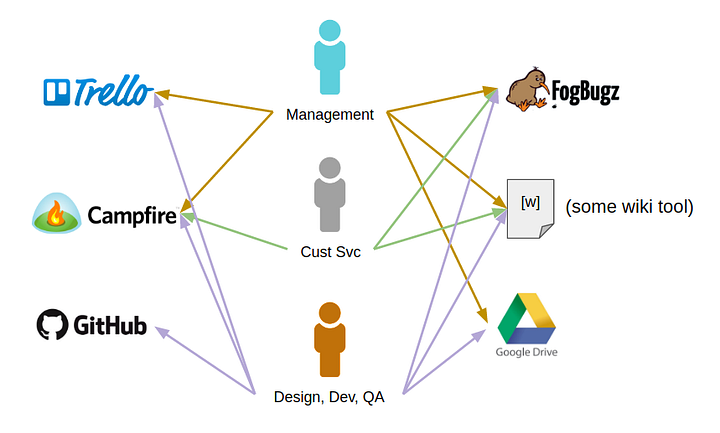
Of course, some of these tools can be tied together with vendor-supplied integrations, web hooks, or some simple scripting. Adding these integration points might make things more convenient for users, but it doesnât change the overall picture:
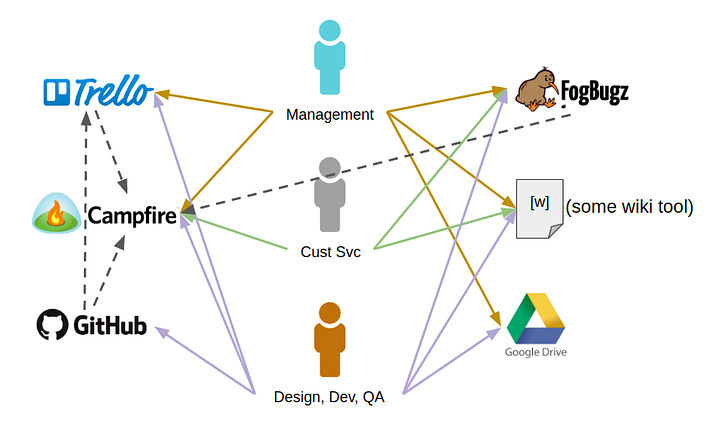
Inevitably, some amount of developer time each month (or week) will now be spent troubleshooting why x is no longer taking to y, and fixing it. People also regularly forget which password goes to which system, and need resets on a recurring basis. [Ed. This happens to me ALL THE TIME.]
Regardless of how good those integrations are, everyone still has to search across two or three or more tools to find what theyâre looking for.
Each tool you add is another silo of data and process, and more friction in the overall workflow.
A (Kinda) Integrated Solution
Many teams opt for the Atlassian/Microsoft/IBM approach â buying a set of tools from the same company, with the promise of tighter integration. Itâs sold as an all-in-one solution, in as much as youâre buying from one vendor. And for the most part, thatâs true â until itâs not.
Tool suites like these do a much better job at tying related data together â build status can show up in the related tasks, support tickets can reference wiki pages, chat can become your companyâs heartbeat. All of those capabilities help to decrease friction, distribute knowledge, and keep the entire organization plugged in to the right priorities.

But theyâre still separate tools. You still have to flip from one app to another to search, get the details, or make updates. Each tool is still deployed and managed in separate software versions, which (sometimes) fall out of compatibility with each other. And donât forget that youâre still going to pay licensing and maintenance for each tool. Even at a bundled rate, youâre probably getting soaked.
Half-way integrated is better than the patchwork quilt approach, but it still creates implicit silos of data, and introduces other hidden costs. Itâs like being half-way delicious.
The Whole Enchilada
Speaking of delicious, what happens when you *actually* integrate tasks, wiki, chat, releases, documents, source code, support, and continuous delivery If you could get all of these chunks of functionality in a single system, how would it affect your experience and productivity
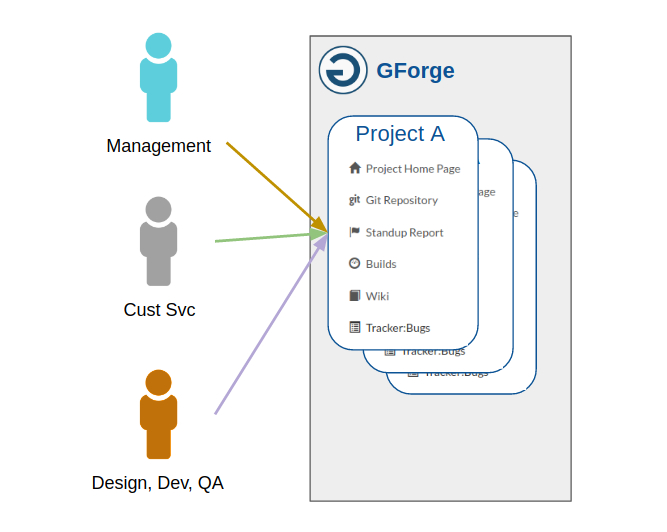
There are some big benefits:
- A seamless experience for managers, development staff, creatives, support and even customers to get involved in.
- A single source of truth for whatâs important, whatâs done, and whatâs next.
- One place for your institutional knowledge to live on. On-boarding becomes easy. Hard-won company wisdom doesnât disappear when someone leaves or changes roles.
- One search box that is deeply connected to all of your projects, source code, documents, information, tasks and discussions. Find a specific key word or error code no matter where itâs hiding.
There are lots of situations where best-of-breed thinking makes sense. In areas where a specific tool improves your productivity, saves money, or just makes work more fun, it can be worth it. If the need youâre filling isnât central to your business, then itâs not a huge risk to try (and maybe abandon) something new. But thatâs not what weâre talking about here.
The way your team organizes and works together is possibly the most important and valuable part of your entire business. Trying to run things using a patchwork quilt of point solutions might seem cool at first, but itâs probably not where you want your team spending their time.
Thatâs why we built GForge. Because we do what you do every day, and we think it should be easier.
Come try GForge Next, and let us know what you think.
Note: My editor wanted me to include email as part of this discussion, but it added way too much to the article. GForge does some great things with email, and I will publish something soon to show how and why.
The Weekly Forge: 10/07/2016
The biggest development this past week is work on GForge AS v6.4.3 has started and we anticipate having it available for current customers by the end of this year. Obviously we’ll continue work on GForgeNEXT which is accurately reflected in the highlight from last week below:
- Git Server Side Merges – Right now server side merges work between any two branches except when the destination branch is master. Turns out the is a bug with Git itself and we already have a patch from the Git development team and we’ll continue testing that out.
- Continuous Integration – We’ve begun designing the mocks required for building a Continuous Integration dashboard for all GForgeNEXT projects using Jenkins. This will complete our vision of making the integration between GForgeNEXT and CI systems tighter which reflects how integral they are to software teams.
- GForgeNEXT iOS – The first view for the GForgeNEXT iOS app has been stubbed out and work will continue over the coming months.
- Dependency Management – When a ticket has predecessors (i.e. blocking dependents) when those tickets are taken care of GForgeNEXT will notify the assignee and submitter of the ticket that work can begin on that ticket. Those notifications will happen with growls which are also sent via push notifications via Adroid/iOS application. This is a big step towards helping PMs and project leads with automated dependency management.
- Improved Link Handling in Docman – Currently in 6.4.2 and prior the links to documents in docman explicitly ping to the most current version (i.e. version 7). The problem is if you email that or include it in a ticket or wiki entry that version may eventually be replaced with newer ones. We’ve made it so the links in docman will always give users the most current version. Don’t worry you can still explicitly send the link to a specific version of a file if you want.
- A handful of bug fixes for v6.4.3 are being actively worked on.
GForgeNEXT Update for 9/30/2016
Beginning this month our team will be giving weekly updates on the GForgeNEXT development. This won’t be the painful details just the good stuff boiled down to a few talking points. We should be clear that GForgeNEXT is in open beta at https://next.gforge.com so sign-up today! Before we give our first update we’d like to share what exactly where GForgeNEXT sits.
- Teams – You can invite new or existing GForgeNEXT users to your projects. When you do so, you pick their role and once the invite accepted they can begin collaboration.
- Tickets – plan and distribute work across your team. We honor existing workflow rules, however, administration of those rules doesn’t exist yet. Browsing and filtering of tickets works just fine. In short while some admin function do exist yet the ticketing system is working well for day-to-day use.
- Stand-up Report – GForge provide each project with a stand-up report. See what each team member has accomplished, what they are working on and what they plan on working on.
- Git Support – Browse branches, tags and commits through the UI (merges and merge requests are under development).
- Continuous Integration – Our new Jenkins plugin uses the latest Jenkins release which will pave the road for new features. Right now the Jenkins plugin accurately reports build activity back to the GForgeNEXT project and this is fully tested and working. Future work will include building a CI dashboard in GForgeNEXT.
- Android Support – Access chatroom and tickets all while getting push notifications while you are on the go. (iOS application is under development).
- Language Support – GForgeNEXT will eventually support multiple languages. Right now we support Spanish and English and the language is set based on browser preferences which is nice for new users.
Update for 9/30/2016
- Git – Server side merges is code complete and being tested internally. Once this is done we will move right into merge requests.
- Notification Center – this feature is similar to what you see on social media sites like Facebook. This week we are adding additional formatting to notifications (date of notification and project it was generated from). The posts are also now navigable, taking the user to the proper artifact (i.e. ticket, chat, etc)
- iOS App – Development began last week.
- Responsive UI – We’ve been doing testing to ensure GForgeNEXT renders and functions properly using the small displays on mobile devices. The only area giving us problems was the mega-menu (the main way to navigate projects on the device)
- Tickets – We’re making dependency management a key feature when working with tickets. The search API for tickets in GForgeNEXT had to be expended to make this possible and we’ve updated the interface to make this as slick as possible. We will be sure to call attention to any ticket you are viewing that has dependencies.
As always we welcome questions on any of the activity you see.